


TOM: The Organised Method
3.816.00 Reviews
App Specs
- Version
- 2.4.9
- Updated On
- License
- Free
- Downloads
- 50,000+
- Developer
- The Organised Mum
- Categories
- House & Home
- Platform
- Android, iOS
Screenshots
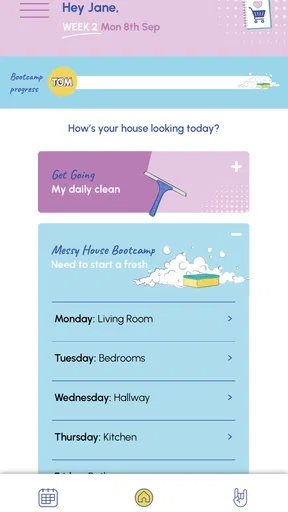
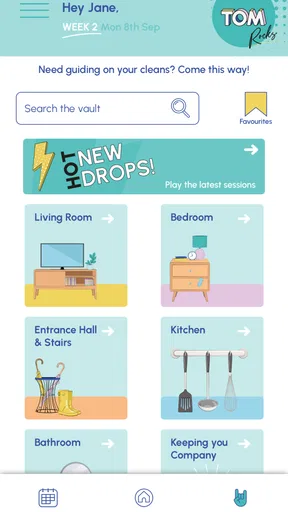
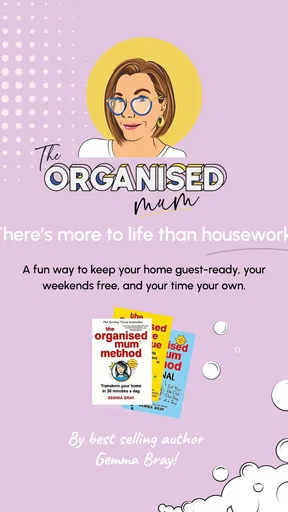
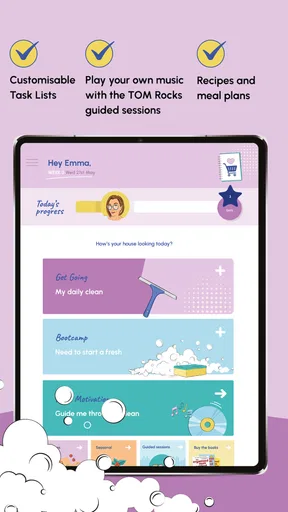
 Analysis by AppCompare
When a household shares chores, calendars and grocery decisions, the hard part is often not remembering a single task; it is making sure the right person knows about it at the right time. TOM: The Organised Method is a free home-organisation app from The Organised Mum, and its appeal is the promise of a more deliberate routine rather than another place to collect scattered notes. I’d consider it for a household that wants a consistent way to think about domestic jobs, while keeping expectations realistic: a shared app can help people coordinate, but it cannot make everyone use it or agree on what “done” means.
A shared day, not just a personal checklist
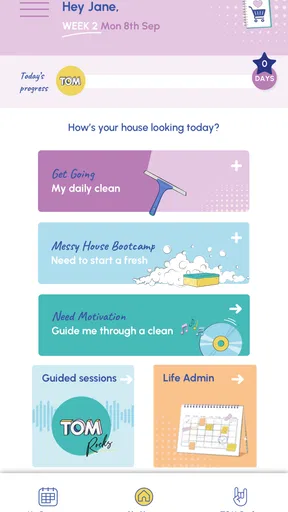
Picture a weekday morning: one person is getting ready for work, another is handling school bags, and someone notices that the kitchen needs attention before the evening. A useful routine gives each person a clear next step instead of leaving one household member to remember everything. TOM’s home-focused approach makes it more relevant to this sort of daily rhythm than a general task manager built mainly around office projects.
The practical benefit is not simply having chores written down. It is being able to turn vague intentions into actions that fit around the day. I’d start with a small set of recurring household jobs and agree on what counts as finished, rather than trying to map every room and responsibility immediately. That keeps the method from becoming another project that someone has to manage.
For a shared device, I’d also decide whose account it represents before putting household tasks into it. A phone passed between family members can make a list convenient, but it can blur who created an item, who is expected to do it and whether a change was intentional. A quick household agreement about how the device is used is more reliable than assuming an app will settle those questions automatically.
Set boundaries before building the routine
I would avoid treating the app as a place for every kind of household information. Start with the cleaning and organising tasks that people actually need to coordinate, and keep private notes, personal commitments and sensitive details elsewhere unless everyone using the device is comfortable seeing them. That simple boundary makes shared use easier to explain and reduces the chance of a household list turning into a catch-all record.
It also helps to decide who is allowed to add or change recurring jobs. If one person adjusts the routine every time they notice a new task, the list can quietly become a record of that person’s standards rather than a plan the household has agreed to follow. I’d review changes together occasionally and remove jobs that no longer fit, instead of letting the routine grow without limit.
For younger users, the sensible question is not only whether an app is suitable for their age, but what they will see on the shared phone and whether they should be responsible for changing household plans. TOM is rated for Everyone, which makes its age context broad, but that is not a substitute for a parent or caregiver deciding how a child uses a shared device. I’d keep expectations clear and give children only tasks they can realistically complete.
Worth Reading Before You Choose

EA SPORTS FC Mobile 26 Is a Bigger Football Game, but It Takes Time

Flipboard Shows What News Apps Must Do Beyond the Feed

Switching to Android Auto Means Rethinking Your Driving Routine

Google Calendar Makes a Crowded Week Easier to Manage

Ludo King Makes the Most of the Minutes Between Plans

Baby Panda World Brings Quick Play to Modern Phones, but Its Game Library Feels Busy
What's the Buzz About TOM?
Let’s dive into what makes TOM: The Organised Method a standout in the crowded world of productivity apps. At its core, TOM is designed to streamline your life by keeping everything organized in one place. Whether you're managing work projects, personal goals, or even your grocery list, TOM has got you covered.
The interface is super intuitive. You can easily drag and drop tasks, set reminders, and categorize everything with a few taps. It’s like the app reads my mind and suggests exactly what I need before I even realize it. That’s a game changer for someone like me who’s always on the go.
Features That Make Life Easier
One of the coolest features TOM offers is the ability to sync across all your devices. I mean, who doesn’t want to access their to-do list from their phone, tablet, and laptop seamlessly? This means no more hunting down your forgotten grocery list or scrambling to remember that meeting because it’s all right there, synced and ready.
Another thing I love is the integration with calendars and email. You can link up with Google Calendar or Outlook, making sure you never double-book yourself again. Plus, the email integration means you can turn emails into tasks with just a few clicks. Goodbye, email overwhelm!
Getting Started with TOM
Setting up TOM is a breeze. The app offers a quick tutorial when you first dive in, guiding you through the basics and ensuring you hit the ground running. And if you’re a visual person like me, you’ll appreciate the color-coding feature. You can assign different colors to different types of tasks, making it super easy to glance and see what’s on your plate for the day.
There’s even a focus mode, which I’m obsessed with. It helps minimize distractions by temporarily hiding less important tasks. This way, you can zero in on what really needs your attention without the overwhelm.
Room for Improvement?
Now, nothing’s perfect, right? While TOM is a fantastic app, I did find myself wishing for a few more customization options. For instance, the ability to add custom themes or backgrounds would be a nice touch, giving users a bit more personalization.
Also, while the app is generally smooth, there were a couple of times I noticed a slight lag when switching between different sections. It’s not a deal-breaker, but something to keep in mind.
Coordination works best with a light touch
For household coordination, I’d use reminders selectively. A notification for a time-sensitive job can prevent a missed handoff, but reminders for every small chore can create noise and make the app easier to ignore. A better starting point is to reserve them for tasks with a real deadline, then see whether the household finds that level of prompting helpful.
There is also a useful distinction between assigning responsibility and merely recording work. If a shared list is only a catalogue of chores, people may still assume someone else will handle them. Before adding a job, decide who owns it, when it needs attention and whether it repeats. That small conversation is often more important than elaborate categorisation.
TOM’s cross-device syncing, as described in the app’s feature set, can suit a person who moves between devices. For a household, though, the benefit depends on everyone using a compatible setup and keeping the same information current. I would test the routine with one or two people first, then expand it only if the handoff is genuinely clearer. If each person needs a separate, carefully controlled identity or access rules, a dedicated shared-household platform may be a better fit than assuming one account will handle those boundaries.
Who will get the most from it?
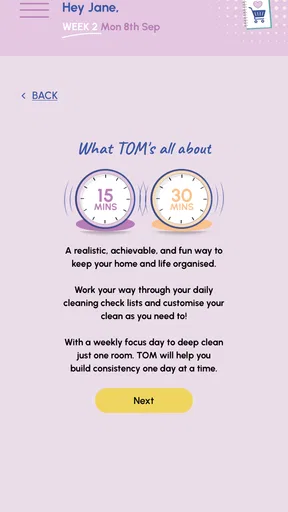
The Organised Mum’s app is most appealing to someone who wants housework to feel more planned and less mentally sticky. It can be a reasonable choice for a busy parent, a person living with a partner, or anyone who has a small set of repeatable domestic tasks they keep forgetting to spread across the week. It is less compelling for someone who already has a household system that everyone follows, or for a user who mainly wants a minimalist one-off checklist.
Compared with a paper chore chart, an app can be easier to update and carry around, while paper remains visible to everyone who walks past it and needs no device handoff. Compared with a generic to-do app, TOM’s identity is more clearly tied to home routines. A general-purpose planner may still win if you need complex project workflows, extensive personalisation or one unified system for work and home. I’d choose based on the friction you are trying to remove, not on the number of features you can potentially use.
A practical way to evaluate the routine is to try it with one recurring responsibility, such as keeping a commonly used room in order. Note whether the task is clear, whether its timing fits the household and whether anyone has to chase another person to complete it. If the app makes the plan easier to see but does not improve those conversations, the household may need a clearer agreement more than another organisational tool.
Cost, age context and the household verdict
TOM is free to download, with optional in-app purchases listed from $1.49 to $4.49 per item. I’d begin without paying and only consider an optional purchase if the app has already become part of a routine you actually use. Its Everyone content rating is broad, but families should still decide together what belongs on a shared screen and whether children should edit the household plan. The app has a 3.8 average from around 620 ratings and has passed 50,000 installs, which suggests an established audience without guaranteeing that its approach will suit every home.
It was released on August 11, 2019, and the current version is 2.4.5, with Android 7.0 as the minimum operating-system requirement. Those details matter if you are installing it on an older household phone; check the device’s system version first rather than planning a routine around an app you cannot run. The rating and install count are context, not a substitute for trying the method against your own household’s habits.
In a nutshell, TOM: The Organised Method is a home-organisation app that may help turn recurring chores into a routine people can see and discuss. I would recommend giving it a modest trial if the mental load of remembering domestic jobs is the main problem. I would skip it if you need robust access boundaries, if your household will not share one routine, or if a visible paper chart already works better. The strongest result is likely to come from pairing the app with a fair agreement about responsibility, not expecting the app to create one by itself.
Final Thoughts: Is TOM Worth It?
In a nutshell, TOM is a powerhouse of a productivity app. It’s packed with features that genuinely make life easier, especially for those of us juggling multiple hats. The seamless integration, intuitive interface, and handy features make it a must-try for anyone looking to boost their organization game.
Whether you’re a busy professional, a student, or just someone trying to keep track of life’s chaos, TOM is definitely worth checking out. So, go ahead and give it a whirl. It might just be the organized companion you've been searching for!
Pros
- User-friendly interface for easy navigation.
- Customizable task lists and reminders.
- Seamless syncing across devices.
- Robust collaboration features for teams.
- Offline mode available for productivity everywhere.
Cons
- Limited features in the free version.
- Occasional sync delays with cloud storage.
- No dark mode option for night use.
- In-app purchases can become costly.
- Requires stable internet for full functionality.
FAQs for TOM: The Organised Method
What is TOM: The Organised Method?
TOM: The Organised Method is a productivity app designed to help users manage tasks efficiently. It features a user-friendly interface that allows you to create to-do lists, set reminders, and track progress. It’s ideal for both personal use and professional project management, offering a seamless way to stay organized.
Is TOM: The Organised Method available on both Android and iOS?
Yes, TOM: The Organised Method is available on both Android and iOS platforms. You can download it from the Google Play Store for Android devices and the Apple App Store for iOS devices. This ensures that users across different platforms can access its features and benefits.
Does TOM: The Organised Method offer synchronization across devices?
Absolutely, TOM: The Organised Method provides synchronization across multiple devices. By creating an account, you can seamlessly sync your tasks and progress whether you’re using a smartphone, tablet, or computer, ensuring that all your information is up-to-date wherever you are.
Are there any subscription fees for TOM: The Organised Method?
TOM: The Organised Method offers both a free version and a premium version. The free version includes basic features, while the premium version, available as a subscription, unlocks advanced functionalities such as collaboration tools, additional themes, and priority support. Pricing details can be found within the app.
How user-friendly is TOM: The Organised Method for beginners?
TOM: The Organised Method is designed with beginners in mind, featuring an intuitive interface and helpful tutorials to guide new users. The app includes a straightforward setup process and easily accessible support, making it simple for users of all experience levels to get started and make the most of its features.


